The ESP32-S3-DevKitC-1, by touch
The ESP32-S3-DevKitC-1 is Espressif's entry-level ESP32-S3 board: Wi-Fi, Bluetooth Low Energy, and almost every GPIO broken out to two long rows of header pins, one down each side. It plugs into a breadboard or takes jumper wires, and you program it over USB.
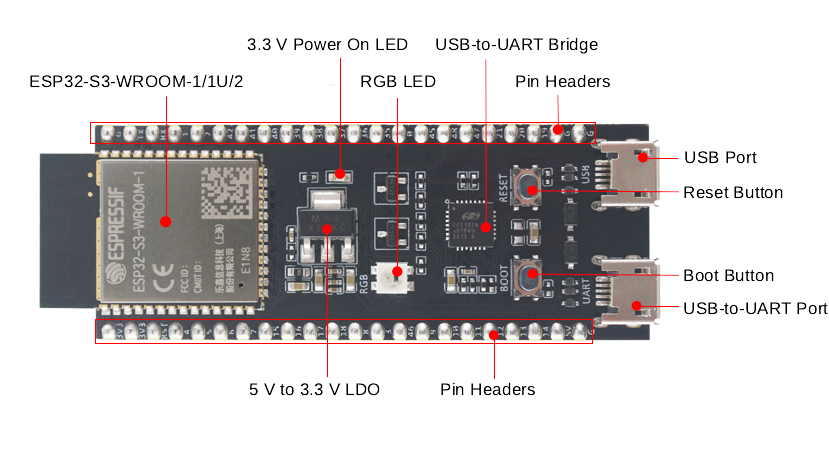
The brains of the board sit in the module: a smooth, flat rectangle about the size of a postage stamp, soldered onto the end of the board opposite the USB ports. It has a small bite out of one corner: hold the board chips up with the USB ports toward you, and the bite is at the module's far right corner. That's the ESP32-S3-WROOM-1, and inside it are the ESP32-S3 chip itself, its flash and PSRAM memory, and the antenna. The antenna is the far end of the module, a sort of rectangle that hangs past the end of the board.
The other end of the board is the end you plug in. It has two USB-C ports side by side along the edge, and just behind them, two small push buttons, Boot and Reset. Espressif's own board uses micro-USB, but mine have USB-C.
These are my notes on it, written so you can wire one up without looking at it, because I can't.
Buying one⌗
I got a pack of 3 ESP32-S3 boards on Amazon. Spares are handy, because sooner or later one of them meets 5 V on the wrong pin.
The module has a code printed on it that tells you how much memory you've got. N is flash and R is PSRAM, in megabytes, so N8R8 means 8 MB of flash and 8 MB of PSRAM.
There are two revisions of the board on the market, v1.0 and v1.1. The only difference is which GPIO drives the RGB LED: GPIO48 on v1.0 and GPIO38 on v1.1. If a sighted friend tells you your blink code does nothing, try the other one. (Mine always does nothing, as far as I can tell.)
Pin order⌗
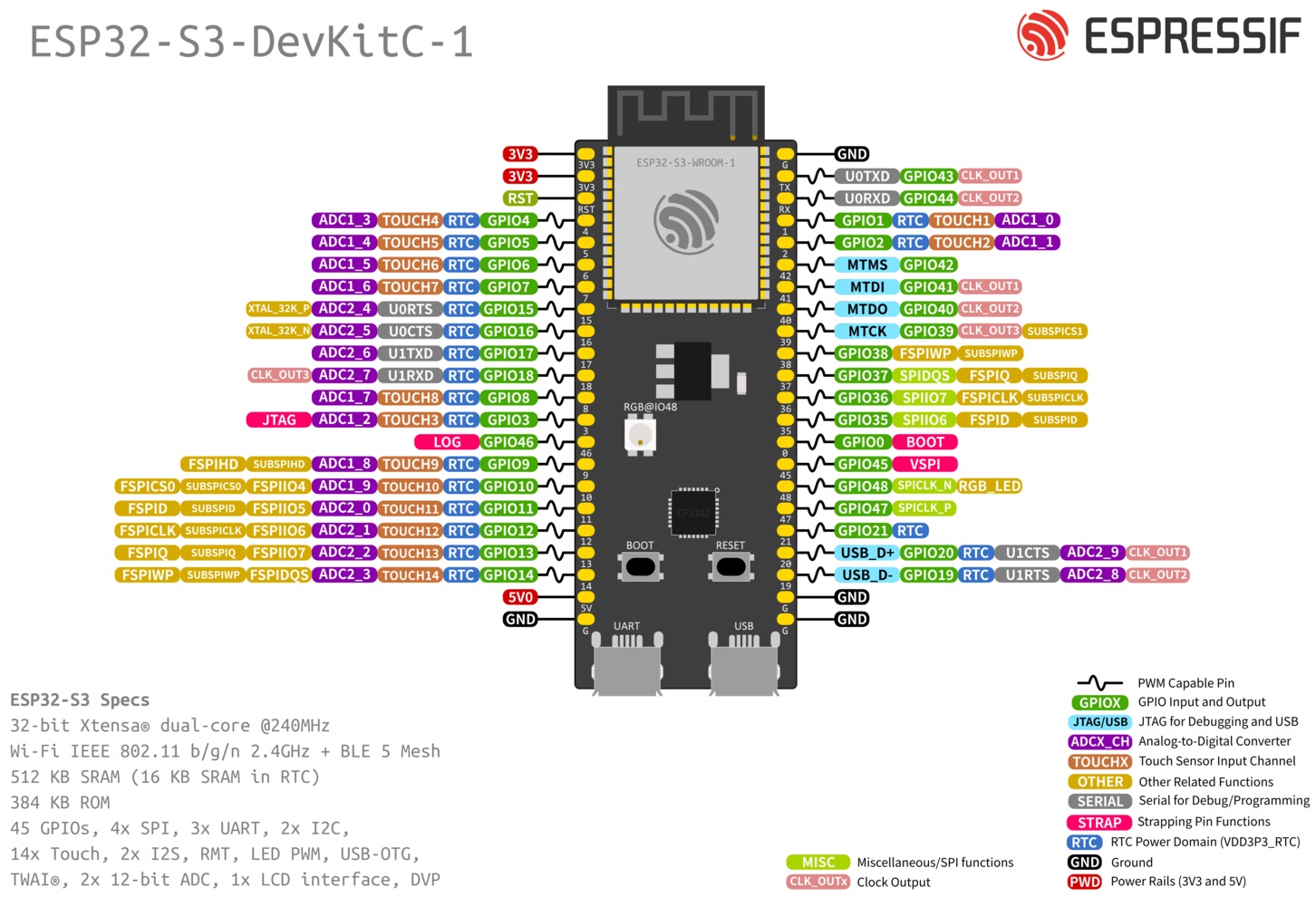
Hold the board chips up, with the two USB ports toward you and the module, with its antenna, away from you. There's a header down each side, 22 pins each. Pin 1 of each is at the far end, by the module, so these tables read from the far end toward you.
Left header (J1)⌗
| # | Pin | What it is | Notes |
|---|---|---|---|
| 1 | 3V3 | 3.3 V power | |
| 2 | 3V3 | 3.3 V power | |
| 3 | RST | Reset (EN) | Same as the Reset button |
| 4 | 4 | GPIO4 | ADC1, touch |
| 5 | 5 | GPIO5 | ADC1, touch |
| 6 | 6 | GPIO6 | ADC1, touch |
| 7 | 7 | GPIO7 | ADC1, touch |
| 8 | 15 | GPIO15 | ADC2; 32 kHz crystal input |
| 9 | 16 | GPIO16 | ADC2; 32 kHz crystal input |
| 10 | 17 | GPIO17 | ADC2; UART1 TX |
| 11 | 18 | GPIO18 | ADC2; UART1 RX |
| 12 | 8 | GPIO8 | ADC1, touch |
| 13 | 3 | GPIO3 | ADC1, touch; strapping pin |
| 14 | 46 | GPIO46 | Strapping pin |
| 15 | 9 | GPIO9 | ADC1, touch |
| 16 | 10 | GPIO10 | ADC1, touch |
| 17 | 11 | GPIO11 | ADC2, touch |
| 18 | 12 | GPIO12 | ADC2, touch |
| 19 | 13 | GPIO13 | ADC2, touch |
| 20 | 14 | GPIO14 | ADC2, touch |
| 21 | 5V | 5 V power | |
| 22 | G | Ground |
Right header (J3)⌗
| # | Pin | What it is | Notes |
|---|---|---|---|
| 1 | G | Ground | |
| 2 | TX | GPIO43 | UART0 TX, wired to the USB-to-UART port |
| 3 | RX | GPIO44 | UART0 RX, wired to the USB-to-UART port |
| 4 | 1 | GPIO1 | ADC1, touch |
| 5 | 2 | GPIO2 | ADC1, touch |
| 6 | 42 | GPIO42 | JTAG (MTMS) |
| 7 | 41 | GPIO41 | JTAG (MTDI) |
| 8 | 40 | GPIO40 | JTAG (MTDO) |
| 9 | 39 | GPIO39 | JTAG (MTCK) |
| 10 | 38 | GPIO38 | RGB LED on v1.1 |
| 11 | 37 | GPIO37 | Taken by octal PSRAM, see below |
| 12 | 36 | GPIO36 | Taken by octal PSRAM, see below |
| 13 | 35 | GPIO35 | Taken by octal PSRAM, see below |
| 14 | 0 | GPIO0 | Boot button; strapping pin |
| 15 | 45 | GPIO45 | Strapping pin |
| 16 | 48 | GPIO48 | RGB LED on v1.0 |
| 17 | 47 | GPIO47 | |
| 18 | 21 | GPIO21 | |
| 19 | 20 | GPIO20 | USB D+, wired to the native USB port |
| 20 | 19 | GPIO19 | USB D−, wired to the native USB port |
| 21 | G | Ground | |
| 22 | G | Ground |
USB ports and buttons⌗
With the ports toward you, the left one is the USB-to-UART port and the right one is the ESP32-S3's native USB port. Either one powers the board and can flash it, but Espressif's guide uses the USB-to-UART port by default, since support for the native port isn't fully implemented in their software.
The buttons sit just behind the ports: Boot on the left, Reset on the right.
- Reset restarts the board.
- Boot puts it into firmware download mode: hold Boot, press and release Reset, then let go of Boot. You only need this if flashing won't start on its own.
Some cables only charge and have no data lines. If the computer doesn't see the board, try another cable before you blame the board.
Power⌗
There are three ways to power the board, and you should only use one at a time:
- Either USB port, or both. This is the default and the one Espressif recommends.
- The 5V and G pins.
- The 3V3 and G pins.
Pins to stay away from⌗
- GPIO35, 36 and 37 are used internally to talk to the flash and PSRAM on boards with octal PSRAM. That's every R8 or larger module, which is most of them. Don't use them.
- GPIO0, 3, 45 and 46 are strapping pins. The chip reads them at power-up to decide how to boot. Use them only if nothing you wire up pulls them high or low at boot, or you may get a board that won't start.
- GPIO43 and 44 (TX and RX) carry the serial monitor. GPIO19 and 20 carry the native USB port.
Everything else is fair game. The ESP32-S3 can route I2S, UART, SPI and most other signals to any GPIO, and "ADC" or "touch" in the tables is just an extra thing that pin can do, not a restriction. If you're hooking up the MAX98357A amp, GPIO4, 5 and 6 work well for its three I2S pins. They're pins 4, 5 and 6 on the left header, three in a row just past RST.
Sources⌗
- Espressif: ESP32-S3-DevKitC-1 v1.0 user guide
- Espressif: ESP32-S3-DevKitC-1 v1.1 user guide
- ESP32-S3 boards, pack of 3 (Amazon)
The pin tables, notes and both diagrams are adapted from Espressif's ESP32-S3-DevKitC-1 user guides, © Espressif Systems, licensed under CC BY-SA 4.0. I reorganized and rewrote the text; the diagrams are unchanged. This post is shared under the same license.